12.7. Application Management
Application management is the process of deploying, activating, deactivating, and decommissioning applications on a GEISA ADM compliant platform, for execution within an execution environment.
12.7.1. Software Management
The LwM2M /9/x Software Management object SHALL be used to manage the
Installation and Activation of containerized edge applications running in the
GEISA EE. In contrast to the Firmware Update object, each instance of the
multi-instance Software Management object represents a distinct edge
application Package installed in the EE. The format of the edge application
Package is defined in Base Filesystem for LEE conformant  systems
and SHALL be composed of the following components:
systems
and SHALL be composed of the following components:
X.509 Public Key Certificate used to verify the digital signature in the Package
Digital Signature across the Edge Application Manifest and Edge Application Binary
Edge Application Binary
To minimize edge app container sizes, applications are encouraged to
dynamically link against the libraries provided by the base GEISA environment
rather than providing their own. Consideration for the management of the base
libraries and/or package dependencies will be deferred to a future release; at
this time, no consideration is made for the use of LwM2M object 14 Software
Component.
App Installation and Activation
Similar to Firmware Update, the LwM2M spec permits edge app packages can be transferred to the EE via either of the following methods:
PUSH via Write of the opaque package to
/9/x/2 Package- PULL via Write to resource
/9/x/3 Package URIfor the GEISA platform to download via CoAP/HTTP as soon as practical
- PULL via Write to resource
In contrast to Firmware Update, the Software Management object 9 does not
support the concept of automatic Installation or Activation. Both operations
of Installation and Activation are manually executed by the EMS, following
successful package download/verification and successful package install,
respectively.
During creation of an Software Management object 9 instance to install an edge app,
an ADM conformant EMS SHALL use the AppID as the object 9 instance number, in order to
simplify subsequent app management operations (start, stop, purge, etc.).
- The following example demonstrates GEISA compliant edge app installation and
activation:
PULL download of the edge app package from the URL set by the EMS into
/9/x/3 Package URI, shown in Figure 12.9.The EMS performing a manual Execute
/9/x/4to trigger edge app Installation following successful app download and verification, shown in Figure 12.10.The EMS performing a manual Execute
/9/x/10to trigger edge app Activation following successful app installation, shown in Figure 12.10.The EMS performing a manual Execute
/9/x/6to trigger Uninstall of the edge app (not shown).
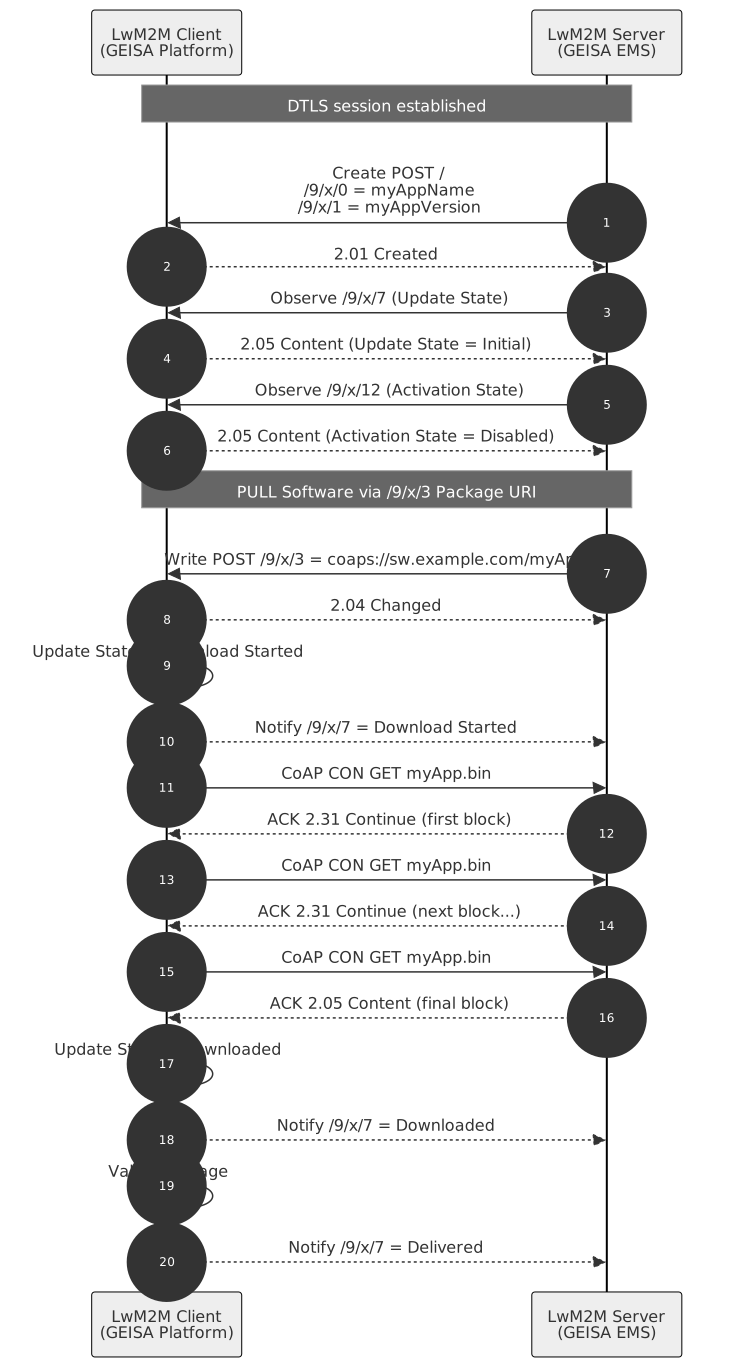
Figure 12.9 Edge App Image Pull
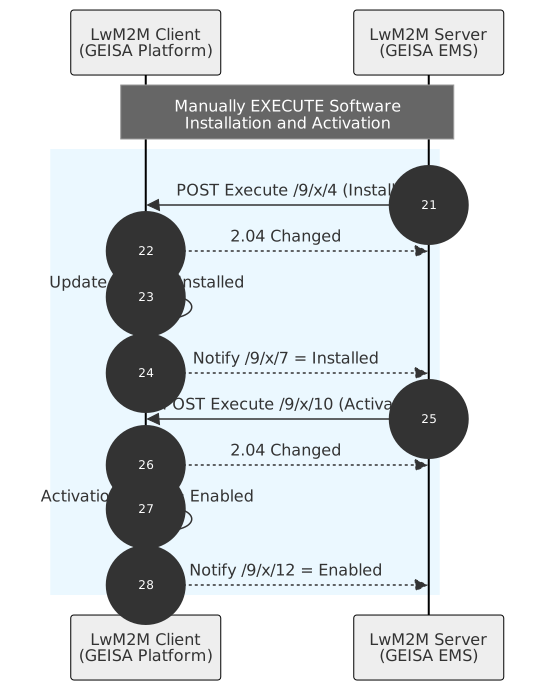
Figure 12.10 Edge App Install and Activate
The Software Management object Activation state machine defines the ability to use an app but does not address app execution state semantics:
When the current state is set to ACTIVE, the installed software can be used by the LwM2M Client.
When the current state is set to INACTIVE, the LwM2M Client MUST NOT use the installed software.
App Execution State
Version 1.1 of the Software Management object adds resources for an EMS to control the Execution State of an edge application:
Resource ID |
Operation |
Data Type |
Description |
|---|---|---|---|
19 |
Execute |
Start Application. Only available when Activation State = Enabled. |
|
20 |
Execute |
Stop Application. Only available when Activation State = Enabled. |
|
21 |
Read |
Integer |
Execution Status. 0 = Stopped. 1 = Running. |
App Purge
Version 1.1 of the Software Management object adds an executable resource for an EMS to remotely purge local data from an instance of an edge application installation:
Resource ID |
Operation |
Data Type |
Description |
|---|---|---|---|
22 |
Execute |
Purge Data. Deletes existing local application data without modifying the app installation/activation states. |