12.5. Device Management
Device management within GEISA allows system operators to track, update, restart, and reset edge environments. As discussed under Registration, when a GEISA ADM conformant device starts, it registers with the GEISA Edge Management System (EMS).
The Registration context allows the EMS to track the general status of the edge device fleet. To facilitate effective management, during Registration an ADM conformant EMS SHALL Read or Observe as appropriate all required GEISA objects advertised by the device platform, including:
Object ID |
Object Name |
Information |
|---|---|---|
3 |
Device |
Mfg, Model, S/N, Firmware Version, System Clock, Storage, etc. |
4 |
Connectivity Monitoring |
IP Address, Link Quality, LwM2M Network Bearer, etc |
6 |
Location |
GNSS location |
10 |
Cellular Connectivity |
3GPP connection management |
11 |
APN Connection Profile |
APN connection management |
12 |
WLAN Connectivity |
Wi-Fi Radio interface management |
13 |
Bearer Selection |
LwM2M bearer selection management |
20 |
Event Log |
System Log and App-specific Log retrieval |
504 |
Remote SIM Provisioning |
eSIM profile management: reporting, swap, add/delete |
3600 |
GEISA App Messaging |
App data reporting on the uplink, App config on the downlink |
3601 |
GEISA Host Monitoring |
CPU, RAM, process, context switch, file handle observability |
3602 |
GEISA App Accounting |
System-level and App-level bandwidth usage and optional throttling |
To avoid the overhead of full re-Registration during normal session continuance, ADM conformant devices SHALL send a lightweight Registration Update prior to the expiration their Registration Lifetime in order to maintain their Registration context with the server. Although not directly specified in the LwM2M protocol, ADM conformant devices SHOULD send a Registration Update after expiration of 50% of the Registration Lifetime, similar to the timing strategies of RFC 2131. Upon receipt of a Registration Update, an ADM conformant EMS SHALL restart the Lifetime expiration timer for the device. ADM conformant devices SHALL only perform a full re-Registration under the following conditions:
Registration Lifetime expired
Client or Server loses the Registration state
Change of Server URI or Security Context
Re-Bootstrap
Client reachability change (IP Address, NAT binding, Endpoint name, etc.)
ADM conformant devices that maintain their Registration state across reboots are not required to perform a full re-Registration after a reboot or power restoration.
Device management is also used to perform platform-level firmware updates. Firmware updates are performed using LWM2M Object 5, Firmware Update.
ADM conformant GEISA devices shall support device reboots as well as device factory resets, using LWM2M Object 3. Factory resets of an ADM conformant device shall remove all installed applications and any associated application data. During factory reset, the EMS MAY specify management of local LDevID credentials by submitting an argument with the Execute /3/0/5 operation:
No Argument or Argument = 0 indicates that the Client MUST preserve its IDevID upon factory reset.
Argument = 1 indicates that the Client MUST preserve both IDevID and LDevID(s) upon factory reset.
The LwM2M Device Management and Service Enablement interface exposes the facility to perform device, application, and network management operations on an ADM conformant GEISA platform:
Discover – Used by a LwM2M Management Server to retrieve the list of Resources instantiated in each Object instance. Data (Resource Values) is not returned.
Read – Used by an EMS to retrieve Resource data values (e.g., sensor reading). Reading may be performed at various levels: Resource Instance, entire Resource, Object Instance, entire Object
Read-Composite – Used by an EMS to retrieve multiple Resources/Objects in single CoAP request.
Write – Used by an EMS to modify Device configuration.
CoAP PUT is used to Replace the Object Instance or Resource(s) with the new values provided.
CoAP POST is used for Partial Update to update the Resources with the new values provided, leaving other existing Resources unchanged.
Write-Composite - Used by an EMS to update multiple Resources/Objects in single CoAP request.
Execute – Used by an EMS to invoke commands on the platform (e.g., Factory Reset, Activate Edge App).
Create – Used by an EMS to create new Object Instances on the LwM2M Client of the platform.
Delete – Used by an EMS to delete Object Instances on the LwM2M Client of the platform.
Write-Attributes – Used by an EMS to set Notification triggers for an Observe of a Resource/Object (e.g., Only send a Notification every two hours, only send a Notification if the observed value has changed by more than X).
These operations are performed using the following CoAp methods:
Operation |
CoAp Method |
Path |
Success |
Failure |
|---|---|---|---|---|
Read |
GET Accept: Content Format ID |
/{Object ID}/{Object Instance ID}/{Resource ID} |
2.05 Content |
4.00 Bad Request, 4.01 Unauthorized, 4.04 Not Found, 4.05 Method Not Allowed, 4.06 Not Acceptable |
Discover |
GET Accept: application/link-format |
/{Object ID}/{Object Instance ID}/{Resource ID} |
2.05 Content |
4.00 Bad Request, 4.01 Unauthorized, 4.04 Not Found, 4.05 Method Not Allowed, |
Write |
PUT Content Format: |
/{Object ID}/{Object Instance ID}/{Resource ID} |
2.04 Changed 2.31 Continue |
4.00 Bad Request, 4.01 Unauthorized, 4.04 Not Found, 4.05 Method Not Allowed, 4.06 Not Acceptable 4.08 Request Entity Incomplete 4.13 Request Entity Too Large |
Write |
POST Content Format: |
/{Object ID}/{Object Instance ID} |
2.04 Changed 2.31 Continue |
4.00 Bad Request, 4.01 Unauthorized, 4.04 Not Found, 4.05 Method Not Allowed, 4.06 Not Acceptable 4.08 Request Entity Incomplete 4.13 Request Entity Too Large |
Write-Attributes |
PUT |
/{Object ID}/{Object Instance ID}/{Resource ID} ?pmin={minimum period}&pmax={maximum period} >={greater than}<={less than}&st={step} |
2.04 Changed |
4.00 Bad Request, 4.01 Unauthorized, 4.04 Not Found, 4.05 Method Not Allowed, |
Execute |
POST |
/{Object ID}/{Object Instance ID}/{Resource ID} |
2.04 Changed |
4.00 Bad Request, 4.01 Unauthorized, 4.04 Not Found, 4.05 Method Not Allowed, |
Create |
POST Content Format: |
/{Object ID} |
2.01 Created |
4.00 Bad Request, 4.01 Unauthorized, 4.04 Not Found, 4.05 Method Not Allowed, 4.06 Not Acceptable |
Delete |
DELETE |
/{Object ID}/{Object Instance ID} |
2.02 Deleted |
4.00 Bad Request, 4.01 Unauthorized, 4.04 Not Found, 4.05 Method Not Allowed, |
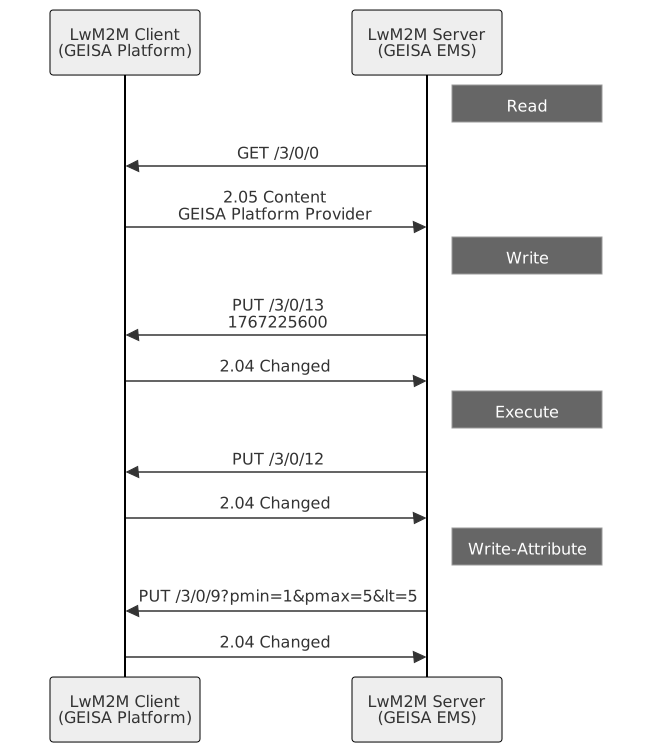
Figure 12.3 Device Management Operations
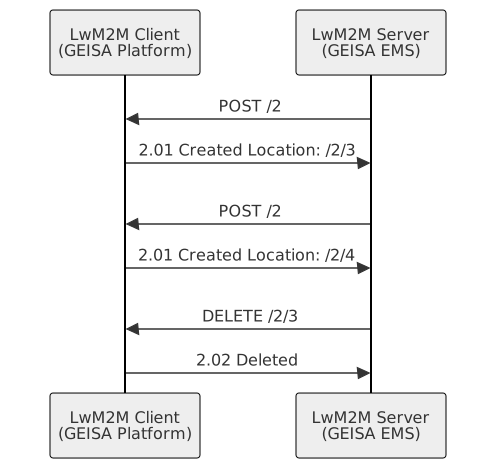
Figure 12.4 Object Creation and Deletion