12.6. Firmware Management
Firmware management is the process of updating the core operating system for an ADM compliant GEISA platform.
The LwM2M singleton object /5/0 Firmware Update represents the firmware
update process, not simply the firmware image stored on the device. Object
/5/0 is advertised during initial Registration, and object /5/0 is not
deleted by the GEISA platform client after an upgrade; only the /5/0/3
State and /5/0/5 Update Result resources are reset after an upgrade to
reflect the new baseline.
The multi-step Firmware Update transaction typically involves the EMS Observe
/5/0/3 State so that the GEISA platform client will provide asynchronous
updates of client state changes to the EMS, after which the EMS will proceed with
subsequent steps in the transaction. Although it is technically possible to
Observe resources /5/0/3 and /5/0/5 following initiation of the update
transaction, in order to avoid transaction dead locks or inconsistent state due
to race conditions, and to provide optional support for resource /5/0/14
Automatic Upgrade at Download, a GEISA ADM conformant EMS SHALL perform the
following:
Observe
/5/0/3 Statewhen object/5/0is advertised during GEISA platform RegistrationRead
/5/0/5 UpdateResult after Notification that/5/0/3 State = Idle
Depending on EMS capabilities, LwM2M allows either of the following methods for firmware image distribution to the GEISA platform:
PUSH (CoAP block-wise transfer) via the Write operation of the opaque binary image to resource
/5/0/0(Package)PULL via the Write operation to resource
/5/0/1(Package URI), allowing the GEISA platform to download via CoAP or HTTP as soon as practical.
The following sequence diagrams provide two examples of GEISA conformant
upgrades of the platform firmware. The first example demonstrates PUSH of the
firmware image to /5/0/0 Package, as shown in Figure 12.5
followed by the EMS performing a manual Execute /5/0/2 to trigger the
upgrade in Figure 12.6.
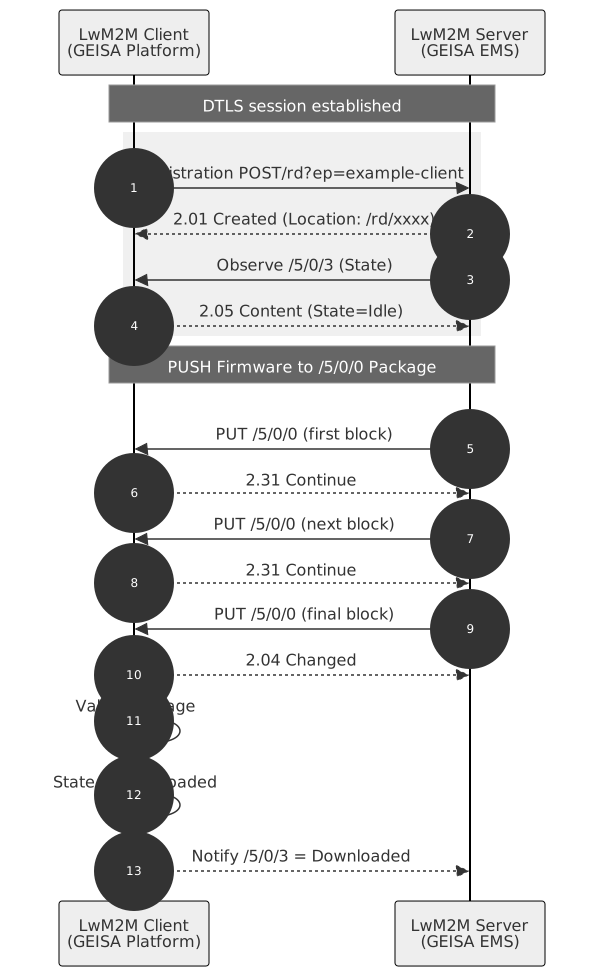
Figure 12.5 Firmware Over-the-Air Push Update
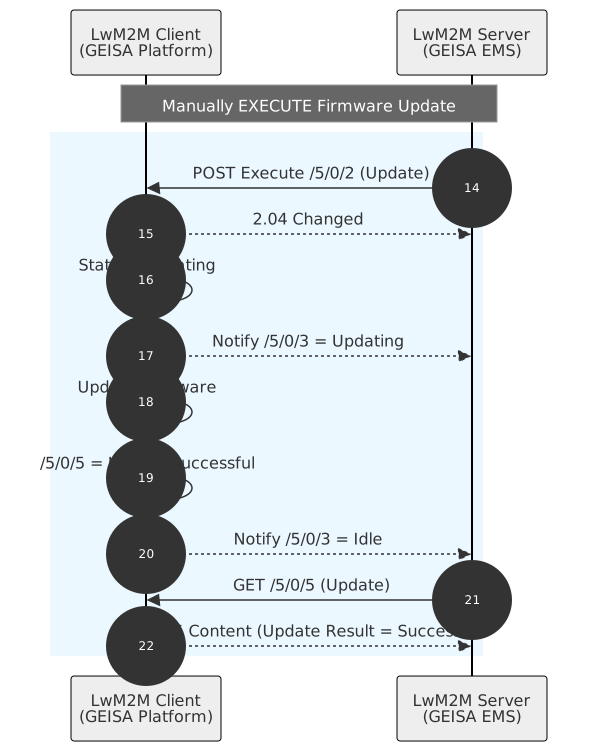
Figure 12.6 Firmware Over-the-Air Manual Activate
The second example, as shown in Figure 12.7, demonstrates the
PULL of the firmware image from the URL set by the EMS into /5/0/1 Package
URI. As shown in Figure 12.8, the ADM conformant GEISA
platform automatically executes the upgrade after the download per the EMS
setting /5/0/14 Automatic Upgrade = True.
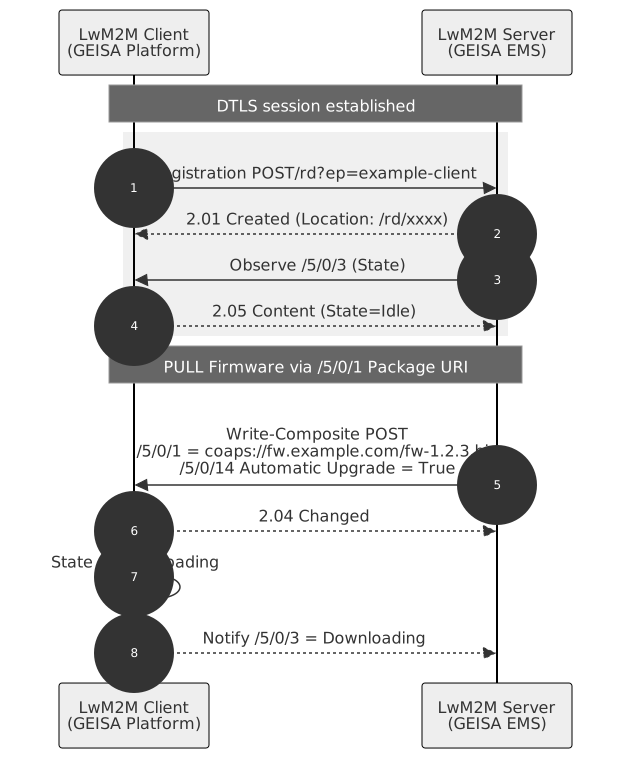
Figure 12.7 Firmware Over-the-Air Pull Image Initiate
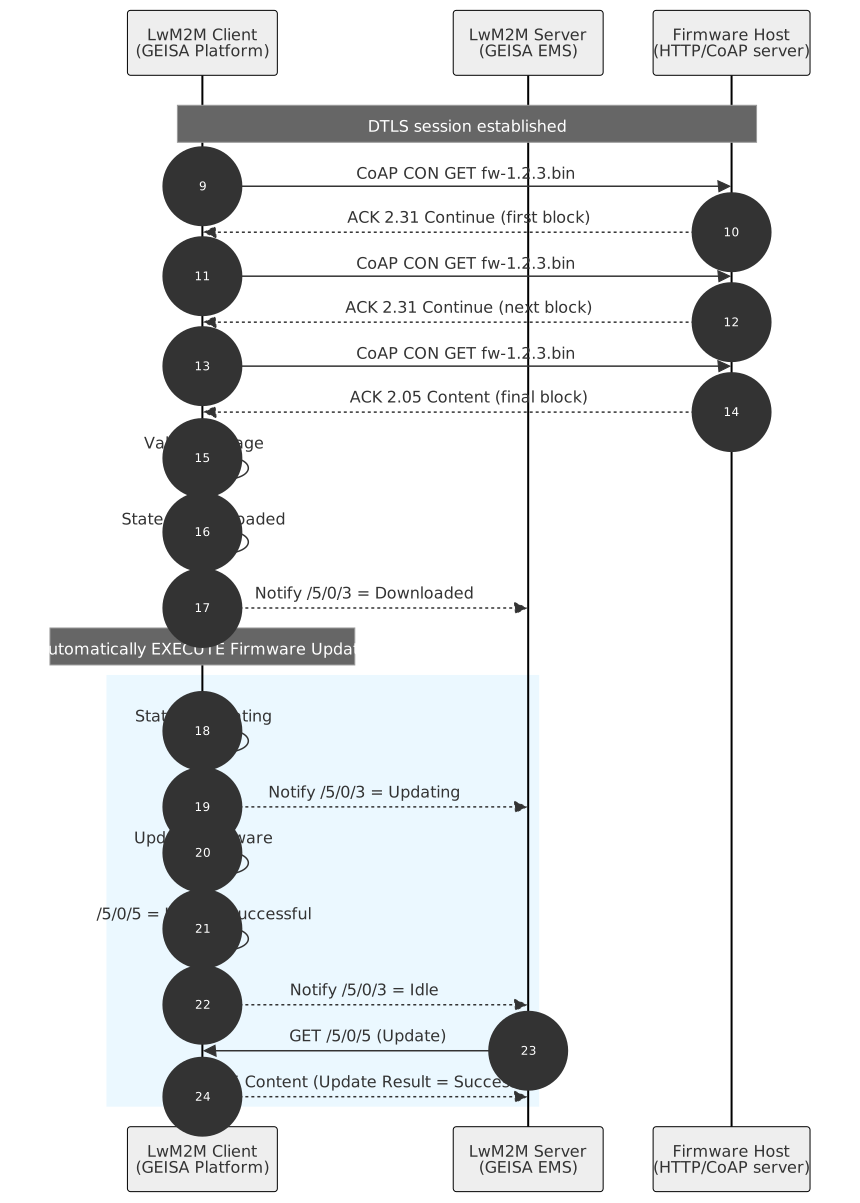
Figure 12.8 Firmware Over-the-Air Pull Automatic Download and Update